Monday, 2 February 2015

Notes responsive design principle

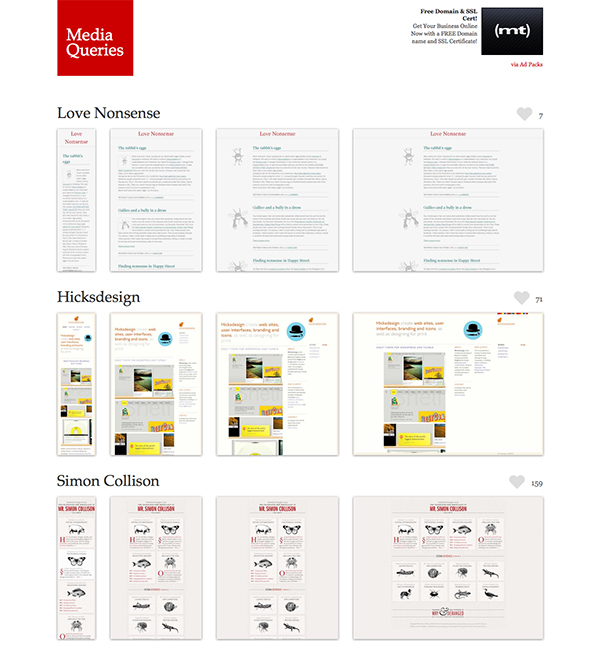
The mediaqueri.es website offers lots of inspiration for some top-notch responsive web designs.
Element 1 (base element) 100%

Element 2 / 3 / 4 80% of the base element

Element 5 / 6 55% of the base element

Next problem is the shift positions between portrait and landscape layout / how the elements work as a whole.

Give up control of the overall design and focus on the elements and the relationship between them.

That way no matter the size/ format of the canvas you still have rule in place that the design adhere to

https://m.youtube.com/watch?v=Epv2AYSrEhc

When passing mock ups off to developers


The idea of a style guide might work, the ability to clearly explain the importance of each element in a hierarchy, how they react to one another and how they alter dependant on canvas orientation.

There would need to be a clear, percentage based, labelling system worked out where you had a base element that set the ratios of all the other elements. 


"The Challenges a Responsive Web Brings

Working with responsive design isn’t without its challenges. First of all, there are such a multitude of devices and screen sizes that we have to cater for. From extra-large to large screens, from small to mid (and everything in between) there’s a lot to think about. And, as I’m sure you already know being a developer, working with responsive design from the technical side of things can also turn nightmare-ish and be extremely difficult to handle."
"Like with any project, the main things you need to think about with responsive web design are the content of the website, how this content fits into the design and how the content flows from page to page. You need to look at how the different design elements you have work together and ensure that everything feels cohesive and consistent.

The difference with responsive web design is that you also need to think about how all of this works from one size to another, whether that is width or height based. You need to think carefully about how all of this translates to a smaller or larger screen and how all of your design elements, your content flow and everything else works. You need to keep the experience consistent, no matter the size of the website.Maybe you could modularise the design and try and create a base element that is pertinent to the other elements"

Saturday, 31 January 2015

Ethan Marcotte - Responsive Web Design

fig 1.1: The canvas, even a blank one, provides a boundary for an artist’s work. (Photo by Cara StHilaire: http://bkaprt.com/rwd/2/)3

"Of course, web designers have been grappling with this for some time. In fact, our profession has never had an “artifact” of its own. At the end of the day, there isn’t any thing produced by designing for the web, no tangible objects to hold, to cherish, to pass along to our children. But despite the oh-so-ethereal nature of our work, the vocabulary we use to talk about it is anything but: “masthead,” “whitespace,” “leading,” even the much-derided “fold.” Each of those words is directly inherited from print design: just taken down from the shelf, dusted off, and re-applied to our new, digital medium.

Some of that recycling is perfectly natural. We’re creatures of habit, after all: as soon as we move into a new city, or start a new job, we’re mapping previous experiences onto the new, more foreign one, using them to gradually orient ourselves. And since the web is a young medium, it’s only natural to borrow some terms from what we know: graphic design provides us with a rich history that spans centuries, and we’d be remiss not to use its language to help shape our industry.

But our debt to print goes much deeper than language. In fact, there’s another concept we’ve borrowed, one we might not acknowledge all that often: the canvas (fig 1.1).

In every other creative medium, the artist begins her work by selecting a canvas. A painter chooses a sheet of paper or fabric to work on; a sculptor might select a block of stone from a quarry. Regardless of the medium, choosing a canvas is a powerful, creative act: before the first brush stroke, before striking the chisel, the canvas gives the art a dimension and shape, a width and a height, establishing a boundary for the work yet to come. 

On the web, we try to mimic this process. We even call it the same thing: we create a “canvas” in our favorite image editor, a blank document with a width and height, with dimension and shape. The problem with this approach is that we’re one step removed from our actual canvas: the browser window, and all of its inconsistencies and imperfections "


"...in recent years, a relatively new design discipline called “responsive architecture” has been challenging some of the permanence at the heart of the architectural discipline. It’s a very young discipline, but this more interactive form has already manifested itself in several interesting ways.

Artists have experimented with surfaces that react to your voice with a music of their own (http://bkaprt.com/rwd/5/), and with living spaces that can reform themselves to better fit their occupants (http://bkaprt.com/rwd/6/). One company has produced “smart glass technology” that can become opaque once a room’s occupants reaches a certain density threshold, affording them an additional layer of privacy (fig 1.5). And by combining tensile materials and embedded robotics, a German design consultancy has created a “wall” that can bend and flex as people approach it, potentially creating more or less space as the size of the crowd requires (fig 1.6).

Rather than creating spaces that influence the behavior of people that pass through them, responsive designers are investigating ways for a piece of architecture and its inhabitants to mutually influence and inform each other."


This was his major influence when thinking about responsive design.


"...web designers, facing a changing landscape of new devices and contexts, are now forced to overcome the constraints we’ve imposed on the web’s innate flexibility.

We need to let go.

Rather than creating disconnected designs, each tailored to a particular device or browser, we should instead treat them as facets of the same experience. In other words, we can craft sites that are not only more flexible, but that can adapt to the media that renders them.

In short, we need to practice responsive web design. We can embrace the flexibility inherent to the web, without surrendering the control we require as designers. All by embedding standards-based technologies in our work, and by making a slight change in our philosophy toward online design."

Friday, 16 January 2015

Reference Notes

Graphic Design Theory

Pg 57 "solutions must respond to specific human motives and activities, conditions, and settings that may be viewed at a variety of scales or perspectives"

"While the nature of the context is beyond the designer immediate control, a primary design responsibility is to determine which factors, and how many factors, within that context the design will address."

"When it is not possible for a design to reconcile the inevitable array of competing priorities, we must decide to value some things as more important than others."


Look at the principles of gestalt psychology : Priciple of proximity, Principle of similarity, Principal of good communication, Principle of closure.

Pg 212

Thorburn and Jenkins - rethinking media change....

..." Suggest that periods of change are usually accomanied by heightened reflection as the new culture comes to grips with the challenges and opportunities introduced by new technology."

Pg 213

In contrast, emerging technologies also carry the burden of past assumptions and practices.

In the early days of he web, screen-based communication looked much like that of print... Unfortunately, much of this approach still remains in many commercial sites.

Pg 214

"Historically, graphic design practice has often focused on constructing visual representations of subject matter (text and image) in books and on signs and screens. In other words, it has focussed on the communicative arrangement of form in the space defined by physical artefacts. But new technologies shift our attention from the arrangement of content to the facilitation of behaviours and mediation of experiences in the environment itself, often without the users' conscious awareness of the mediation"

Geometrix

  Pictures on phone


Friday, 2 January 2015

Reference Notes

Chapter 1 Don't Make Me Think 

Pg11
When looking at a web page "...it should be self-evident. Obvious. Self explanatory.

Pg19
Using a site that doesn't make us think about unimportant things feels effortless, whereas puzzling over things that don't matter to us tends to sap or energy and enthusiasm - and time.

He basically saying when he looks at a really well designed website, where information is accessible and the message is built-in, that he doesn't have to think and can therefore enjoy the time he spends there. This contrasts a poorly designed websites where the goal of the user becomes just to understand how to it works and what it's function is, this "thinking", at best, distracts the user from the design, at worst, alienates the user from the design.

Chapter 2 How we really use the Web

"Rule #1 - We don't read pages. We scan them." Pg 22

Why?

"We're usually in a hurry" - We're motivated to save time and energy.

"We know we don't need to understand everything" - only a fraction of the information matters to us, there for this is what we scan for

"We're good at it."- we have been scanning things like magazines and newspapers all our lives, we know it works.


"Rule #2 - We don't make optimal choices. We satisfice*." Pg 24
(*Satisfice - a cross between satisfying and sufficing.)

Why?

"We're usually in a hurry" - making an optimal choice is hard and takes more time.

"There is not much of a penalty for guessing wrong" - the user can go back if they choose wrong ( in fact... the back button is the most used feature of Web Browsers)

"Weighing options may not improve our chances" - a lot of poorly designed sites exist where nothing makes sense and it is often easier taking a quick chance and just using the back button if you've got it wrong.

"Guessing is more fun" - if you guess right, it's faster and introduces a element of chance


"Rule #3 - We don't figure out how things work. We muddle through." Pg 26

Why?
"It's not important to us" - most people don't need to understand things as long as they can use them to there own ends

"If we find something that works, we stick to it." - once we find something that works for us, no matter how badly, we are unlikely to try and find an alternate way unless we stumble across it.

Chapter 3 - Billboard Design 101

This is important knowledge because now we get an idea that our messages have to be clear, consider and directed. Following this, he gives a list of things to do to make sure that the user sees and understand the site as much as possible (pg31)

Create a clear visual hierarchy on each page
Take advantage of users existing knowledge and the conventions they already know
Order pages into clear divided section
Make any user interaction obvious; navigation, links, buttons etc
Focus attention by minimising any unnecessary noise, less is more

He goes on to say that "there is nothing new about visual hierarchies. Every newspaper page, for instance, uses prominence, grouping, and nesting to give us useful information about the content of the page before we read the words." Pg32 

Para phrasing "We all parse visual hierarchy, we do it automatically, the only time we are aware of it is when we are forced to think about it due to the absence of the visual cues."
Pg 33

The book talks about convention and that these pre-existing cues for people should be used not ignored. He adds that; designer usually, wrongly, assume that they are hired to create something new and exiting but when doing so they focusing on design too much and they should realise that the aim is to focus the user on the content. 
(NTS: Don't reinvent the wheel just for the sake of it, you can still design something great just use these conventions to your advantage and don't get hung up on it being something no one has ever seen before, that would be working against you)

Chapter 4 - Animal, vegetable or mineral?

This chapter discusses click-throughs. There is a general consensus that there should be a limited amount of click through a, however, he argues that it is not how many click there are it is how often you are required to engage your brain. If the click are easy, obvious choices, leading you directly to what you want then it's a choice that take little time to consider. Keep the clicks mindless.

Chapter 5 - Omit needless word

Kruger third law of usability "get rid of half the words on each page, then get rid of half of whats left" pg 45

The reasons for this are simple; it reduces the noise of the page, it makes relevant content more prominent and it makes the page digestible at a glance.

"Happy talk must die" pg 46
(*happy talk - content that serves no purpose except to enclave the ego of the writer, eg welcome text)

"Instruction must die" pg 47
Basically acknowledging that people have good instincts about the web so a lot of the time it is unnecessary to tell them how to suck eggs

If you remove these two forms of conversation you get much more efficient copy.

Chapter 6 - Street Signs and Breadcrumbs 

This chapter discusses user psychology and the transition from real world thinking to digital world thinking in regard to finding your way around a website. He raise the similarities between wandering round a mall looking for a product and using a website in the same way. In both there are paths and directions you take and you know to take these from signs and asking for help. This works the same way online by way of navigation and search engines.

Navigation

He talks about the hierarchy of navigation the same way you use shop signs:

Mall sign
Shop sign
Isle sign
Shelf sign
Products
Product name
Till

Equates to:

Website name
Navigation Bar
Category
Sub sub category
Product list
Product name
Checkout

Consumers use this type of thinking to find what they are looking for. If they can't find what they are looking because something in the chain doesn't make sense or is missing for they get frustrated. 

Search

Search is just like asking a shop assistant for help and getting them to take you straight to the product.

Users use these two methods of searching in three ways; stubborn nav searching, straight to the search engine or a mixture of the two. If any of these ways of searching isn't finding what your looking for you have the back up of the other. However, if both fail the user will leave.

He mentions that there are key differences from the real world:

There's no sense of scale - we have no idea how big the site is, whether it's a 10 page site or a 1000 page site. You've no idea what's on the next page.
No sense of direction - there is no concept of up and down left and right, this means we are unaware of where we are. 
No sense of location - we cannot get a sense of our surrounding, for example without bookmarks it would be very difficult to take shortcuts come back to something you were looking at.

Due to the lack of orientation two things become very important, homepage because it is a fixed point and the back button allowing us to quickly retrace our steps.

However, because there is no sense of physical space, getting from one place to another requires little to no effort and therefore has no consequences. This makes searching significantly easier to do for longer.

In this regard, there are some overlooked benefits of navigation:

It gives us something to hold on to and allows us a fixed point to go back to.
It reveals content, giving us an idea of what we can expect to find on the site
It gives us a starting point and tells us how to use a site
If done well, it creates a good impression allowing the user to feel confident about browsing and potentially 
Tuesday, 9 December 2014

Tutorial - Assessment Guidance


Written piece 1500 words

Submission through turnitin and send a copy to Clinton via email

Write a bibliography - mention everything that you have researched: lectures (even if they haven't helped you directly talk about how they have encouraged you to seek alternatives), articles, books, Pecha Kucha, sites.

Talk about: practice, collaborative piece (how that went, findings specific to collaboration), Pecha Kucha, lectures.

Reference separately about quotes within text: use Harvard referencing system

Presentation 15mins 5mins Q&A

Script it and rehearse beforehand

Hard copies:
Mind maps - printed large, (do one on navigation)
Sketchbooks - Collated. Organise your process and methodology (post it note key section)
USB stick - practical work (bring computer to display and discuss)
Blog - show on computer (highlight main parts in presentation text)


Notes: 

Discuss problem and dilemmas as much as results and finding.

Root activity you've done under method and name your methodologies and use them in your presentation and written piece.

Examples: 
Self Observation
Juxtaposing digital and offline research
Deconstruction when referencing articles in sketchbook

Creat a glossary of terms, that way you remove the possibility of using a lot of jargon

Example
Z layout- definition
F layout- definition


Evaluate your blog and sketchbook in written and presentation work: deceminate it


Thursday, 4 December 2014

Pecha Kucha - Review

The Pecha Kucha was really beneficial for me it allowed me to define the area of research I am interested in exploring further. 

The Pecha Kucha focused on an imaginary word "reconvention" a word generated from reinvention and convention. The idea behind it was to use people predetermined ideas/ conventions and repurpose them to change the way we navigate around a digital space. The presentation focused on my research up to date, the thinking I've been exploring and the direction I'm heading. The final thought was that "I would need to make a small change to make a big difference". In being made to do this in a formal setting and having such a short space of time to focus on each slide, it allowed me to strip away the parts of the research that weren't going anywhere. It also drove my investigation into navigate to a new way. It lead me the question how do we navigate in the real world and how has that transfers online.

Practice 1 - Update

Interesting research.

This piece of research discusses the way the brain has bastardised existing evolutionary neural circuits and repurposed them to allow us to deal with the process of reading:


"we are not born with brain circuits dedicated to reading. After all, we did not invent writing until relatively recently in our evolutionary history, around the fourth millennium B.C. So the human brain improvises a brand-new circuit for reading by weaving together various regions of neural tissue devoted to other abilities, such as spoken language, motor coordination and vision"

This piece of research discusses "place cells" and "grid cells" and there importance in terms of navigating our environment.

"Important clues have come from work honored by today’s Nobel. Half of the prize went to John O’Keefe, a neuroscientist at University College London, for the discovery of “place cells.” In the early 1970s, O’Keefe used hair-thin electrodes to record the electrical activity of neurons in the hippocampus of rats as they ran around an enclosure. Place cells, as their name suggests, fire only when the rat passes through a particular place. The other half of the Nobel went to May-Britt and Edvard Moser, neuroscientists at the Norwiegian University of Science and Technology in Trondheim for the more recent discovery of “grid cells” in 2005. These cells fire at regular intervals as a rat moves through space, marking out an imaginary grid."

Similar studies done on rats in a virtual and a real world environment. Showed a big difference in the amount of place cells firing in the brain. These showed a significant reduction in navigation due to lack of external stimuli.

"The rats were then immersed within a virtual-reality screen picturing a room with walls decorated in different blue and green shapes. They then ran around said virtual room atop the treadmill ball."... ..."Later, the researchers repeated the same experiment within a visually identical actual room, 10 feet by 10 feet in size. The results? About 60 percent of the place cells that fired in the rats' brains inside the actual room, with all its sensory stimuli, were inactive in the virtual space. Which means all of that other stuff – the equivalent, for humans, of a subway grate underfoot, or the smell of Lake Michigan to your East – seems to matter a great deal."

Grid cells, triangular pattern.

In reading these separate pieces of research, I have been asking the question has the ability to reconfigure brain circuits been used to understand how to navigate an online space? Could the grid cells be used to map the online environment and the place cells be used to understand that environment and allow us to figure out where things should be. 

For example: On a webpage, do you drop these grid cells around around the page and when you see a logo in the top left corner, does the brain use place cells to tell you where that should be?

Could we be reaffirming these place cells everytime we visit a site and does this explain in part why these conventions arise.

Could we use this theory to alter how we navigate?